
Most companies that share desks did not start with software. They started with a spreadsheet, because a spreadsheet is free, everyone already knows how to use one, and for a small office it genuinely works.
This guide does both halves of that story. First, how to build a desk booking spreadsheet that actually prevents double bookings, with the formulas, so you can have something working in about twenty minutes. Then the specific, concrete points at which a spreadsheet stops being enough, so you can recognize them when they arrive rather than after a year of quiet frustration.
Here is the finished version, free and with no form to fill in: download the desk booking spreadsheet template (.xlsx). It opens in Excel, and in Google Sheets via File > Import > Upload > Replace spreadsheet, which carries the formulas, the desk dropdown and the conditional formatting across.
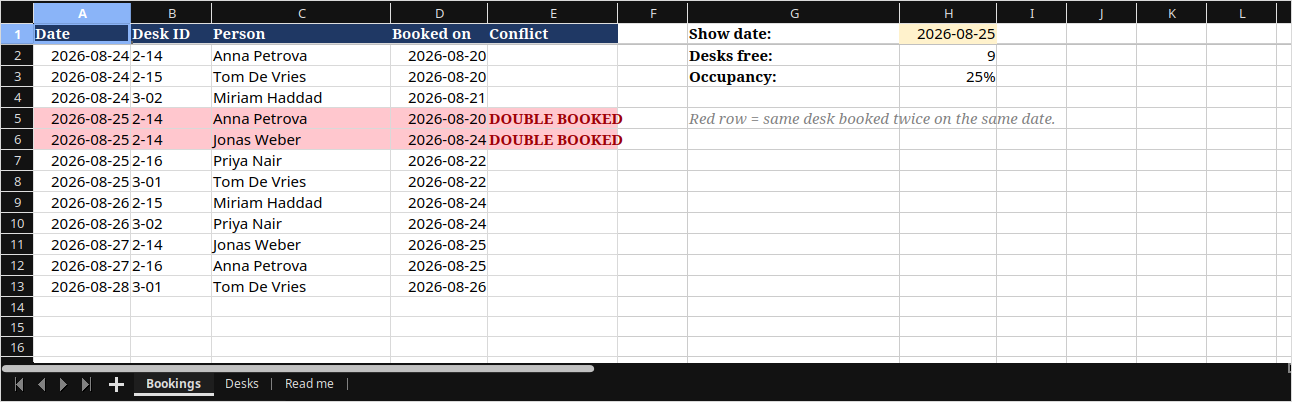
Three tabs, already working with sample data you can delete:
If you would rather understand it than inherit it, the section after next builds the same sheet from empty.
Yes, and for a single office of roughly thirty desks or fewer it is often the right answer. A spreadsheet handles the core job of desk booking, which is recording who has which desk on which day, and it costs nothing.
The conditions are specific, though, and worth being blunt about in both directions rather than discovering them a year in.
A desk booking spreadsheet works when:
A desk booking spreadsheet stops working when:
If you recognize yourself in the first list, the template above will serve you for a long time and you can stop reading after the build section. If you recognize yourself in the second, the last two sections are the ones that matter.
Worth being clear on what you are building: a spreadsheet where people reserve a desk in advance is desk hoteling, not pure hot desking. Pure hot desking is first-come, first-served and needs no system at all. If you are building a booking sheet, you have already decided people should be able to plan ahead.
You need two tabs and one formula. The two tabs separate your desks from your bookings, and the formula catches the double bookings that are otherwise guaranteed to happen.
This works identically in Excel and Google Sheets. Google Sheets is the better choice if more than one person will book, because it handles simultaneous editing properly and Excel does not unless the file is on SharePoint or OneDrive.
The first tab is your desk inventory. Call it Desks, and give it one row per physical desk:
The second tab is the booking log. Call it Bookings, one row per desk per day:
One COUNTIFS in column E does the entire job. It counts how many rows share the same date and the same desk, and flags any row where that count is greater than one.
Put this in Bookings!E2 and fill it down:
=IF($A2="","",IF(COUNTIFS($A:$A,$A2,$B:$B,$B2)>1,"DOUBLE BOOKED",""))The outer IF is not decoration. Without it every empty row below your bookings compares blank against blank and the sheet fills with false alarms, which is how people learn to ignore the warning.
Then make it visible rather than something people have to scroll to find. Select A2:E1000, add a conditional formatting rule using a custom formula, and give it a red fill:
=AND($A2<>"",COUNTIFS($A:$A,$A2,$B:$B,$B2)>1)Two more formulas earn their place immediately. Put the date you want to look at in H1, and this in H2 for the number of desks still free that day:
=COUNTA(Desks!$A$2:$A$200)-SUMPRODUCT(--(COUNTIFS($A$2:$A$1000,$H$1,$B$2:$B$1000,Desks!$A$2:$A$200)>0))The shorter version of that, counting booking rows for the date, is wrong in exactly the case you care about. A double-booked desk counts twice, so the sheet reports fewer free desks than you have, at the precise moment someone is looking for one. Counting distinct desks avoids it.
And bookings per desk over the whole period, in Desks!E2, filled down. This is the one number that will eventually tell you which desks nobody wants:
=COUNTIF(Bookings!$B:$B,$A2)A warning about the date column, because it is the single most common reason these sheets silently stop working. If dates are stored as text rather than real dates, every COUNTIFS above returns zero without any error message. The sheet looks fine and catches nothing. Check by right-aligning the column: real dates align right by default, text aligns left.
A desk booking spreadsheet fails on human factors long before it fails on formulas. Four settings prevent most of that.
Desks!$A$2:$A$200. Without it you will get 2-14, 2.14, and Desk 14 as three different desks, and your conflict formula will not match any of them.It breaks at the point where the sheet stops describing reality. The formulas keep working; what fails is the assumption that what is in the sheet is what is happening in the office.
The failures are predictable, and they arrive in roughly this order.
People book desks and then work from home, and almost nobody goes back into a spreadsheet to delete a row. Within a couple of months your sheet shows an office that is fuller than it is.
This matters more than the daily inconvenience, because the occupancy numbers from that sheet are the ones that end up in a conversation about whether to renew a floor. A booking system that nobody cancels out of does not produce utilization data, it produces intentions data, and the two diverge in the expensive direction.
A spreadsheet answers is there a desk free. The question people actually ask is where is my team sitting on Thursday, and a flat list of rows cannot answer it without reading and cross-referencing.
This is the failure that quietly undermines the whole point of asking people to come in. If the reason for the office is collaboration, a booking system that cannot place someone near their colleagues is solving the wrong half of the problem.
Two people open the sheet on the train, both see desk 2-14 free, both take it. The conflict formula turns a cell red afterwards, which is a record of the collision rather than a prevention of it.
For a small team this is rare enough to shrug at. Once attendance peaks on Tuesdays and Thursdays and demand starts to approach supply, it stops being rare, and the person who arrives to find their desk taken stops trusting the system. Trust is what a booking system runs on; once it goes, people stop booking and start just turning up.
Yes, in three different senses, and they have genuinely different trade-offs rather than one being the real answer. The spreadsheet above is the first: free, yours, and limited in the ways just described.
The second is the free tier of a paid product. These are real and often fine, and the catch is almost always a cap, on desks, on users, or on the reporting that would tell you whether the whole arrangement is working. Worth reading the cap before the feature list, because the cap is what you will hit.
The third is self-hosted open source. There is no license fee, and you pay instead in hosting, updates, security patching, and the integration work to connect it to your calendar and staff directory. That is a sensible trade for an organization with an IT team that wants to own the system, and a poor one for an office manager who was hoping to stop maintaining a spreadsheet.
If your company runs on Microsoft, that is a more specific question than a general search for free software, and it has a better answer: see desk booking that integrates with Office 365, which covers booking from inside Outlook rather than from another tool people have to remember to open.
And most paid tools, Tribeloo included, have a free trial, which is the cheapest way to find out whether the thing you are missing is really worth paying for. It is a fair test: run it during a normal week, not a quiet one.
When you need it to answer a question it structurally cannot, rather than when it simply becomes annoying. Annoyance is survivable. The six signals listed near the top of this guide are the practical test, and they rarely arrive alone: once two or three of them are true at the same time, the sheet has stopped being the cheap option and started being the one that hides things from you.
At that point the thing you are buying is not a nicer grid. It is real-time availability so two people cannot take the same desk, cancellation and check-in so the utilization data means something, a floor plan so people can sit near their team, and a booking flow that lives where people already work. That is what desk booking software does that a spreadsheet cannot.
If you reach that point, our guide to choosing hot desk booking software for the hybrid workplace covers what to evaluate and in what order.
A desk booking spreadsheet is not a failure of planning, it is the correct first step. Build it properly, with two tabs, real dates, dropdowns, and the COUNTIFS conflict check, and it will serve a small office well for a long time.
Just watch for the moment it stops describing reality. When bookings stop being cancelled, when the peak days fill up, and when people start asking where their colleagues are sitting rather than whether a desk is free, the spreadsheet has told you what it can. That is a good problem to have reached, and it is the point at which paying for something starts to pay for itself.
Tribeloo makes it easy to bring employees back together and optimize your hybrid workplace through an easy-to-use hot desk booking software.

