
A practical guide to desk booking software: how it works, the features that matter, and how to pick a system your employees will actually use.
Book a Demo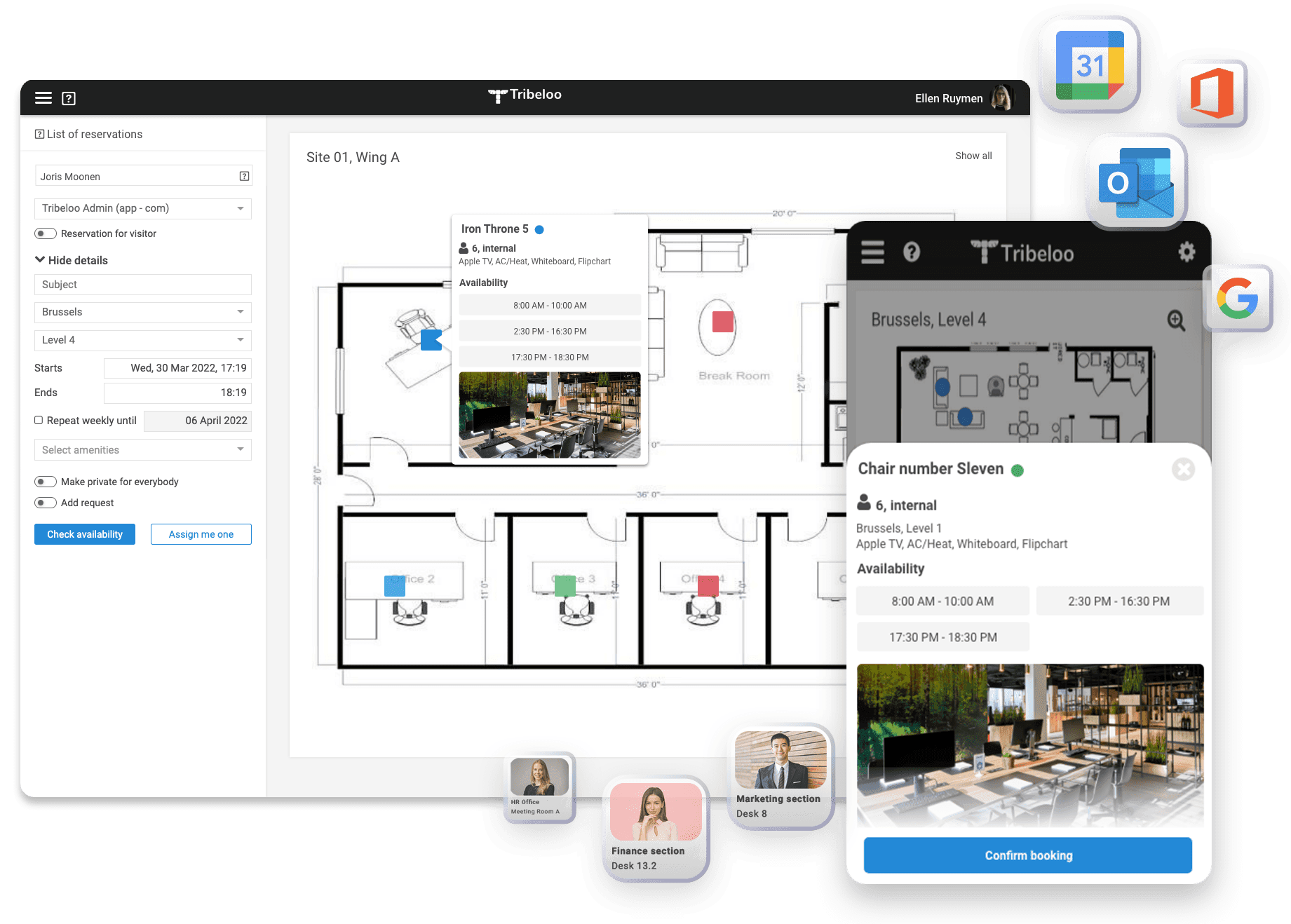
Desk booking software lets employees reserve a desk, meeting room or other workspace before they come to the office, or the moment they walk in. Instead of fixed seating charts, sticky notes or a shared spreadsheet, everyone sees a live floor map of the office, books the spot they need, and knows exactly where their teammates are sitting.
You will also see it called a desk booking system, desk reservation software or office hoteling software. The label matters less than the job: making a flexible office run smoothly when not everyone comes in every day, and giving workplace teams real data on how their space is used.
It became essential with hybrid work. When attendance varies between 20% and 80% across the week, assigned seating wastes space on the quiet days and hot desks without a booking system create chaos on the busy ones.
In practice a desk booking tool does five things:
Three terms that get mixed up, and the distinction is useful when comparing tools:
Most hybrid offices end up with a mix: some assigned desks, some bookable hot desks, and rooms or parking on top. Pick a tool that handles all of them rather than one policy only.
Feature lists look alike, so evaluate against the things that decide success in practice. These six criteria separate the tools that get adopted from the ones that get ignored:
The system only works if employees book without being chased. Look for booking in two or three clicks, a mobile app, and no training requirement. Run a pilot with a skeptical team, not just the facilities department.
If people have to open yet another tool, they will not. Booking from the Outlook sidebar, with the reservation syncing straight back to their calendar, is the single strongest predictor of adoption; Google Calendar users should at least see their bookings appear automatically. Our data shows employees prefer a desk booking system that integrates with Office 365.
A list of desk numbers is not enough. People choose where to sit based on who is nearby and what the desk offers, so the map needs live availability, amenities and colleague visibility.
Check-in and auto-release against no-shows, time limits, recurring bookings for fixed office days, neighborhoods for teams, and support for assigned desks alongside hot desks. If the rules cannot express your policy, the tool will fight you.
Occupancy and utilization reports should answer real questions: do we have too many desks or too few, which zones are dead, what does attendance look like across the week? This is how the software pays for itself, through better office space planning.
Multiple sites and wings with their own rules, single sign-on, directory sync, and pricing that stays reasonable as you grow. Per-resource pricing is easier to predict than per-employee pricing when only part of the workforce comes in.
For a step-by-step comparison checklist, read our guide on how to choose hot desk booking software for the hybrid workplace.
Calendar integration deserves its own section because it is where most rollouts succeed or fail. With Tribeloo, employees book desks straight from the Outlook calendar sidebar, and every reservation syncs back so it shows up on their calendar without a second thought. Teams that run on Google Workspace still see their Tribeloo bookings in Google Calendar, so nobody has to check a separate tool to know where they are sitting. That is exactly why adoption sticks.
If your company runs on Microsoft 365, Microsoft Places covers basic desk and room booking. Dedicated desk booking software that plugs into Outlook adds a floor plan built from any image, your own booking rules, and parking in the same tool.
Tribeloo is desk booking and office space management software built for hybrid workplaces: desk and meeting room booking, neighborhoods, an interactive floor plan you set up with drag and drop, check-in and auto-release, multi-site support, and utilization analytics. Plans start at 3 euro per resource per month, with a 14-day free trial. See pricing for details, or book a demo and we will walk you through it with your own floor plan.
Desk booking software is a tool that lets employees reserve a desk or other workspace before they come to the office, usually from a floor map, a mobile app or their own calendar. It replaces fixed seating charts and spreadsheets, shows real-time availability, and gives workplace teams data on how the office is actually used.
Hot desking is the seating policy: desks are shared instead of assigned to one person. Desk booking software is the system that makes that policy workable, letting people reserve a specific desk in advance so they are not hunting for a free spot when they arrive. Most tools support both hot desks and assigned desks side by side.
Yes. Microsoft Places, part of Microsoft 365, lets people book rooms and shared desk pools and see who is in the office. Its maps need georeferenced IMDF files, and named desks need a paid license since April 2026. If you only need shared desk pools and IT is happy to run it, Places may be enough. Dedicated desk booking software is for when you want more: each colleague's photo on a floor plan built from any image, same-day map changes, and parking in the same tool.
For a handful of people, a shared spreadsheet can work. It breaks down quickly as you grow: no real-time availability, no floor map, double bookings, no check-in or auto-release, and no usage data to plan your space. If you are outgrowing a spreadsheet, purpose-built desk booking software removes that manual overhead.
Most tools are priced per user or per bookable resource per month, typically a few euros or dollars each at the mid-market level. Tribeloo starts at 3 euro per resource per month, and you can try it free for 14 days.
For hybrid teams the essentials are calendar integration so people book from Outlook and see their reservations in their own calendar, an interactive floor map with real-time availability, neighborhoods so teams sit together on office days, check-in with auto-release to stop no-shows, and occupancy analytics so you can right-size the office.
Yes. Employees book desks straight from the Outlook calendar sidebar, and every booking syncs back so it shows up on their calendar automatically. If your company runs on Google Workspace, Tribeloo bookings appear in Google Calendar too, so everyone sees their office days without opening a separate tool.
With Tribeloo you upload your own floor plan and add bookable desks and rooms with drag and drop, or send us any plan and we build the map with you. Most customers are live within days to two weeks. Employees need no training because they book from Outlook or the floor map they already know.
Tribeloo makes it easy to bring employees back together and optimize your hybrid workplace through an easy-to-use hot desk booking software.

